About TapShot: Better Pro Camera
ONE FINGER ZOOM FOR SPORTS Drag one finger up or down to zoom in and out. Immediately tap your finger wherever it is to capture a photo. Perfect for volleyball, basketball, and all your kid's sporting events. Faster and...
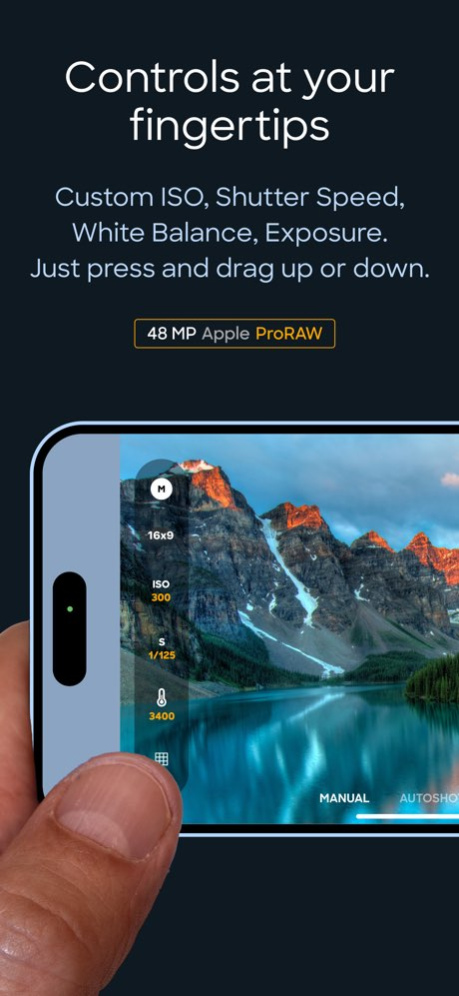
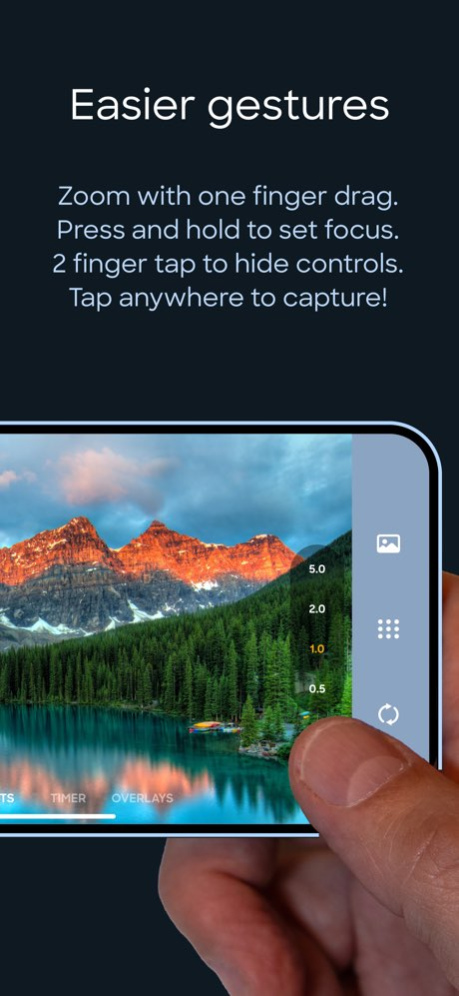
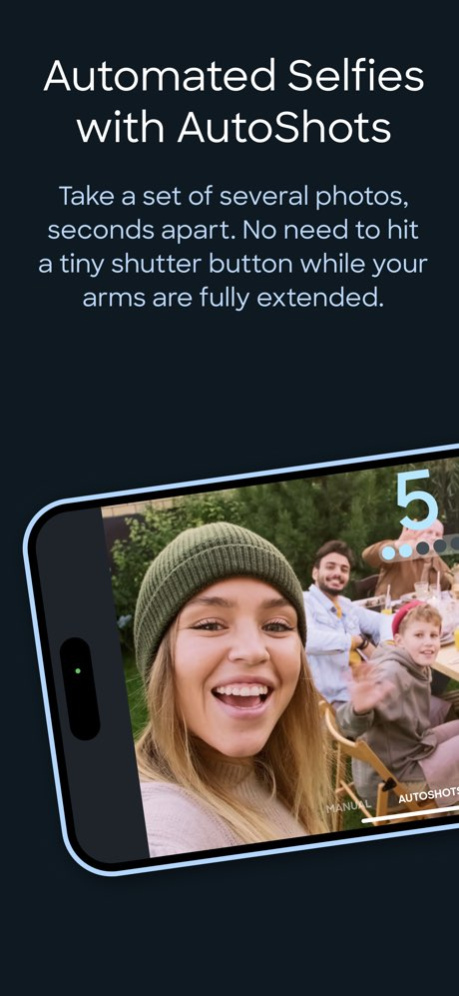
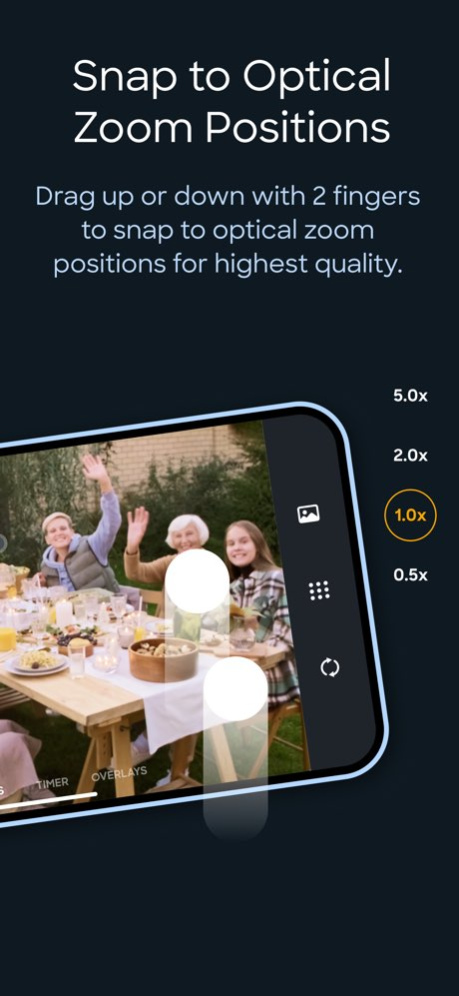
ONE FINGER ZOOM FOR SPORTS Drag one finger up or down to zoom in and out. Immediately tap your finger wherever it is to capture a photo. Perfect for volleyball, basketball, and all your kid's sporting events. Faster and easier to use than the standard pinch gesture. If your iPhone is in the horizontal orientation you can even drag up and down at the side of the screen so your finger doesn’t block the subjects you are taking photos of. NEW: PAUSE VIDEO RECORDING Record the game without the timeouts and stoppages. Less stitching videos together and editing. JUST TAP TO SHOOT Tap anywhere on the image preview to take a photo or start/stop video recording while in video mode. No tiny shutter button. This is so much easier for taking selfies while your arms and hands are fully extended - just focus on framing the shot and tap away. 48 MP APPLE ProRAW AND HEIF For iPhones that support it. CUSTOM FOCUS POINTS Long press for half a second where you would like to set the focus point while maintaining exposure settings. CUSTOM ISO, SHUTTER SPEED, WHITE BALANCE & EXPOSURE BIAS ADJUSTMENTS ToolPod has Auto and Manual modes for toggling between fully automatic photo capture and making manual adjustments to ISO, Shutter Speed and White Balance. ADD YOUR LOGO WHILE TAKING PHOTOS Import your brand or school sports team logo and have it placed on your photos while taking them! No need to use another app afterwards. Choose from 9 locations and set the size and space from the edges. Supports alpha transparency when importing a PNG from iCloud Files. DEPTH CAPTURE MODE On capable iPhones and iPads, use Depth mode to capture and embed depth data to your selfies and rear camera photos. Open and edit with the native Photos app to apply lighting effects and adjust depth of field settings. 4x3 OR 16x9 PHOTO ASPECT RATIOS Traditional 4x3 size or wider 16x9, ideal for social media and video projects. SNAP TO OPTICAL ZOOM POSITIONS Drag with two fingers up or down to snap to the available optical zoom positions of your iPhone. This ensures you are only shooting at the optical zoom positions of your iPhone for best quality. CLEAN VIEW MODE Tap with 2 fingers to hide UI controls for an unobstructed image preview. Tap again with 2 fingers to restore them. PERSONAL PHOTO BOOTH WITH AUTOSHOTS Automated selfie sets. Because no one takes just one selfie - TapShot can automatically take a set of several photos, seconds apart. It means less physical coordination and you can keep your eyes on the screen to frame the perfect poses. If you just need one photo, there is a traditional simple countdown timer as well. BEAUTIFUL COLOR THEMES Choose from 20 different color themes to make your photo and video capturing experience match the color of your iPhone or case. EASY CAMERA SWITCHER The camera switcher always tells you which camera you are using, the current zoom factor, and if you’re at the optical zoom factor for that camera to use the best quality possible. VIDEO RECORDING PRESETS We made it easy to get the right level of quality versus file size. You don’t kneed to know complex video and photo terminology. And you don't need to leave the app to change any settings. 4K, 60FPS, HDR - if your device supports it you can use it in TapShot. COMPLETE PRIVACY No usernames, passwords or logins. We don’t collect a single thing about you or how you use the app. Nothing whatsoever is transmitted from your device to us. Your photos are saved directly to your iPhone’s camera roll so you can use the Photos app to manage and share. Terms of Use: https://www.apple.com/legal/internet-services/itunes/dev/stdeula/ Privacy Policy: https://tapshot.app/privacy
Version History • Fixed a bug that intermittently prevented 48MP captures • Added support for newest iPhone models • Performance improvements 2.8.0 Sep 17 • Updated branding and app icon • Added rounded corners to Image preview views 2.7.5 Jun 19 • New! Added the ability to pause video recordings. Tap to start video, tap to pause and then tap again to resume recording. Double tap to STOP the recording. • Added helpers for first time launch to explain features. • Smoother zooms. Small improvement in smoothness, but there is still minor latency when physical cameras are switching. • Updated file format + capture size preview label: Now will also tell you what megapixel size your capture will be before you take a photo. In video mode this label will display your video capture preset. • Fixed a bug where switching to Video mode might leave the capture size in 4x3 aspect ratio. • Fixed an issue when in Manual Photo mode your custom ISO, Shutter Speed and Color Temperature settings wouldn't be applied when selecting a different physical camera, going from 1.0x to 2.0x etc. Now when changing these settings they will persist across camera selections IF the camera can support the same settings. For example, if an ISO setting is higher than possible it will use the highest possible for that camera. 2.7.1 Apr 27 • Numerous optimizations • Bug fixes 2.7.0 Apr 23 • Increased compatibility with latest iPhone models. 2.6.0 12/02/2025 • Minor bug fix • Updated icons 2.5.1 05/13/2025 • Improved support for latest iPhone models. 2.5.0 10/14/2024 • improved support for newest iPad devices. • moved to single purchase with no subscriptions. 2.4.0 06/08/2024 • Update to User Guide • Minor bug fix 2.3.0 03/18/2024 Bug fixes and minor optimizations. 2.2.0 02/27/2024 REDESIGNED CAMERA SWITCHER The Camera Switcher has been significantly improved. Instead of requiring two taps (one to open and a second to select lens), it now only requires one direct tap as the available zoom factors are displayed all the time and it does not need to “open up”. This means faster selection at all times. If you have an iPhone with multiple cameras, when in Auto mode you can zoom all the way from the widest available zoom value to the maximum zoom value while dragging with one finger. However in Manual mode, when you select a camera it will be fixed and you will zoom from the starting to end values for that specific camera. Simply select the next camera to only zoom with that individual camera. This is to prevent switching to a camera accidentally. Please note there is a small delay when changing selected cameras. Two finger drag gesture will still always snap to the available zoom factors for best quality and no optical scaling. This works in both Auto and Manual modes. BUG FIXES Improved compatibility with older devices Please feel free to ask us questions or suggest new features! We’d love to hear from you. info@tapshot.app 2.1.0 10/20/2023 MORE FILE FORMAT OPTIONS Now you can choose a standalone Apple ProRAW file, ProRAW + embedded HEIF file, or a HEIF file format. On combinations of cameras, aspect ratios or zoom factors when ProRaw is not available, TapShot will fall back to HEIF format automatically. RESOLUTION PREFERENCE For pro iPhones that support it, you can now select 48 MP as your preferred resolution for both Apple ProRAW and HEIF formats. It will then be used when available to your iPhone and when not available, 12 MP will be used. Note that not all cameras and aspect ratio’s support 48 MP capture. In TapShot it is supported when using the Main camera (Wide Angle, 1.0x) in standard 4x3 aspect ratio and Manual adjustment mode. FORMAT LABEL Also for pro iPhone models supporting Apple ProRaw, there is a text label on the main view to remind you of the currently selected file format. Helpful when returning to the app after a period of time. Currently viewable when in portrait orientation. This feature will be expanded in future updates. Please feel free to ask us questions or suggest new features! We’d love to hear from you. info@tapshot.app 2.0.0 10/06/2023 • bug fixes and smoother settings changes. 1.9.6 10/02/2023 SPEED OPTIMIZATIONS Removed the bounce capture animation that appeared with each tap, and added a subtle "capture in progress" visual indicator. This change, along with iOS17's new Zero Shutter Lag and Responsive Capture functionality means much faster captures overall. VISUAL DESIGN Minor design improvements. 1.9.5 09/24/2023 Apple ProRAW For iPhones that support Apple ProRAW, you can now capture with 48 MP Apple ProRAW images when possible. In the Photo Settings menu select either HEIF or Apple ProRAW. If your device supports Apple ProRAW, select the Main camera (1.0x) while in Manual adjustment mode to capture 48 MP images. If 48 MP is not available, TapShot will capture 12 MP Apple ProRAW images. In other modes like 16x9, HEIF format will be used. When HEIF is selected from the Photo Settings menu, HEIF format will always be used. ZERO SHUTTER LAG Support for Apple’s new Zero Shutter Lag capability released in iOS17. When available for use by TapShot, captures are considerably faster to help you grab those quickly changing scenes. Please note that capturing with Apple ProRes takes longer and you will still need to hold your device steady. WHITE BALANCE ADJUSTMENT IMPROVEMENT More precise value selection is now possible as the increment between values has been reduced. This makes dragging on the tool easier to get the perfect color temperature. NEW DEVICE SUPPORT Added support for new Apple iPhones. Please feel free to ask questions or report any issues to info@tapshot.app. 1.9.0 09/22/2023 • Custom White Balance button has been added to the ToolPod. Press down on the thermometer icon and drag up or down to change the color temperature value (Kelvin) • All custom tools (ISO, Shutter Speed, White Balance) can be toggled off and reset to the automatic value by double tapping the buttons. Switching to Auto mode will also clear the manual settings. • TapShot will now attempt to apply all custom settings in Manual mode to the different cameras you might select in the Camera Switcher, as well as the front camera if you switch from back to front cameras. Note however that some values will not apply to the different cameras (ISO, Shutter Speeds) and in that case TapShot will snap to the closest available value. • Grid Tool has been added to both Auto and Manual modes and Video mode. 1.8.0 09/12/2023 • ToolPod now has Auto and Manual modes. Tap the top button to toggle between modes. • Manual Adjust Mode. Set custom ISO and custom Shutter speed. • Individual camera selection when in Manual mode for iPhones & iPads with more than one camera • Auto Mode now contains the Exposure adjustment and Depth capture buttons. • New onboarding experience with quick guide to gestures. • Clean Mode now also hides the main mode navigation. Tap with 2 fingers to toggle. 1.7.0 09/04/2023 • Image Overlay Mode: Import your logo or other image into TapShot and have it placed on your photos while taking them. Import from the Photos app OR iCloud Files and set the location, size, and margin space from the edge of your photos. Great for product photography, school sporting events and more. • Minor enhancements 1.6.0 08/19/2023 • Major design improvements. Interface is better optimized for different device orientations and can move buttons and navigation off of the image preview when possible for a less obstructed photo or video preview. • Larger image preview with increased edge to edge width. • New ToolPod to contain exposure adjustment button, depth mode button, and all future tool additions. The ToolPod will always appear at the left side of the image preview and update dynamically. • 16x9 Photos. Great for social media sites that make use of this aspect ratio. Just tap the “4x3” / “16x9” toggle button in the ToolPod to enter 16x9 mode and tap again to exit back to 4x3. Videos are always 16x9 and this button is not shown in Video modes. • Clean mode. Want a way to hide the ToolPod and Camera Switcher? Tap with 2 fingers anywhere on the image preview to hide them and tap again with 2 fingers to bring them back. This gives you a cleaner interface with an unobstructed preview. 1.5.0 08/07/2023 • Depth capture capability for photos captured with the front or rear cameras on capable iPhones and iPads. Open and edit in the Photos app to apply Portrait lighting effects and adjust depth of field settings, etc. • Added an option to use square corners on the photo and video preview. There is now a menu setting for choosing rounded or squared corners. • Added an in-app User Guide, accessible from the Settings menu. 1.4.0 08/01/2023 • Added an exposure adjustment tool. Press down on the exposure icon and drag up or down to increase or decrease exposure. Double tap to reset back to autoexposure mode. • Added custom focus point capability. Long press for half a second where you would like to set the focus point. • Improved the ability to cancel an AutoShots or Timer session by tapping on the photo preview again or the countdown digits. • Fixed a bug that affected the horizontal panning gesture while using the front camera on an iPad. 1.3.0 07/13/2023 • Introducing modes to very quickly switch between Manual, AutoShots or Timer. (More modes coming soon!) Drag horizontally on the preview image to change modes OR tap on the labels. • No longer necessary to change AutoShots and Timer settings from the Settings menu. • Change AutoShots seconds duration by dragging left or right on the seconds digit. Change number of photos to take by dragging left or right on the dots indicator. • Change Timer number of seconds by dragging left or right on the seconds digit. 1.2.0 07/10/2023 • Now compatible with iPads that do not have a rear camera flash • Minor visual improvements 1.1.1 06/30/2023 • TapShot is now a Universal app with iPad compatibility • Improved screen privacy by hiding previously cached camera preview images • Added 3 day free trial • Minor bug fixes 1.1 06/29/2023 1.0 06/13/2023
Previous Versions
Here you can find the changelog of TapShot: Better Pro Camera since it was posted on our website on 2023-07-21 09:05:15.
The latest version is 2.8.0 and it was updated on 2026-10-08 01:41:23. See below the changes in each version.
TapShot: Better Pro Camera version 2.8.0
Updated At: 2026-10-08
Changes: Version History • Fixed a bug that intermittently prevented 48MP captures
• Added support for newest iPhone models
• Performance improvements 2.8.0 Sep 17 • Updated branding and app icon
• Added rounded corners to Image preview views 2.7.5 Jun 19 • New! Added the ability to pause video recordings. Tap to start video, tap to pause and then tap again to resume recording. Double tap to STOP the recording.
• Added helpers for first time launch to explain features.
• Smoother zooms. Small improvement in smoothness, but there is still minor latency when physical cameras are switching.
• Updated file format + capture size preview label: Now will also tell you what megapixel size your capture will be before you take a photo. In video mode this label will display your video capture preset.
• Fixed a bug where switching to Video mode might leave the capture size in 4x3 aspect ratio.
• Fixed an issue when in Manual Photo mode your custom ISO, Shutter Speed and Color Temperature settings wouldn't be applied when selecting a different physical camera, going from 1.0x to 2.0x etc. Now when changing these settings they will persist across camera selections IF the camera can support the same settings. For example, if an ISO setting is higher than possible it will use the highest possible for that camera. 2.7.1 Apr 27 • Numerous optimizations
• Bug fixes 2.7.0 Apr 23 • Increased compatibility with latest iPhone models. 2.6.0 12/02/2025 • Minor bug fix
• Updated icons 2.5.1 05/13/2025 • Improved support for latest iPhone models. 2.5.0 10/14/2024 • improved support for newest iPad devices.
• moved to single purchase with no subscriptions. 2.4.0 06/08/2024 • Update to User Guide
• Minor bug fix 2.3.0 03/18/2024 Bug fixes and minor optimizations. 2.2.0 02/27/2024 REDESIGNED CAMERA SWITCHER
The Camera Switcher has been significantly improved. Instead of requiring two taps (one to open and a second to select lens), it now only requires one direct tap as the available zoom factors are displayed all the time and it does not need to “open up”. This means faster selection at all times.
If you have an iPhone with multiple cameras, when in Auto mode you can zoom all the way from the widest available zoom value to the maximum zoom value while dragging with one finger. However in Manual mode, when you select a camera it will be fixed and you will zoom from the starting to end values for that specific camera. Simply select the next camera to only zoom with that individual camera. This is to prevent switching to a camera accidentally. Please note there is a small delay when changing selected cameras.
Two finger drag gesture will still always snap to the available zoom factors for best quality and no optical scaling. This works in both Auto and Manual modes.
BUG FIXES
Improved compatibility with older devices
Please feel free to ask us questions or suggest new features! We’d love to hear from you. info@tapshot.app 2.1.0 10/20/2023 MORE FILE FORMAT OPTIONS
Now you can choose a standalone Apple ProRAW file, ProRAW + embedded HEIF file, or a HEIF file format. On combinations of cameras, aspect ratios or zoom factors when ProRaw is not available, TapShot will fall back to HEIF format automatically.
RESOLUTION PREFERENCE
For pro iPhones that support it, you can now select 48 MP as your preferred resolution for both Apple ProRAW and HEIF formats.
It will then be used when available to your iPhone and when not available, 12 MP will be used. Note that not all cameras and aspect ratio’s support 48 MP capture. In TapShot it is supported when using the Main camera (Wide Angle, 1.0x) in standard 4x3 aspect ratio and Manual adjustment mode.
FORMAT LABEL
Also for pro iPhone models supporting Apple ProRaw, there is a text label on the main view to remind you of the currently selected file format. Helpful when returning to the app after a period of time. Currently viewable when in portrait orientation. This feature will be expanded in future updates.
Please feel free to ask us questions or suggest new features! We’d love to hear from you. info@tapshot.app 2.0.0 10/06/2023 • bug fixes and smoother settings changes. 1.9.6 10/02/2023 SPEED OPTIMIZATIONS
Removed the bounce capture animation that appeared with each tap, and added a subtle "capture in progress" visual indicator. This change, along with iOS17's new Zero Shutter Lag and Responsive Capture functionality means much faster captures overall.
VISUAL DESIGN
Minor design improvements. 1.9.5 09/24/2023 Apple ProRAW
For iPhones that support Apple ProRAW, you can now capture with 48 MP Apple ProRAW images when possible. In the Photo Settings menu select either HEIF or Apple ProRAW. If your device supports Apple ProRAW, select the Main camera (1.0x) while in Manual adjustment mode to capture 48 MP images. If 48 MP is not available, TapShot will capture 12 MP Apple ProRAW images. In other modes like 16x9, HEIF format will be used. When HEIF is selected from the Photo Settings menu, HEIF format will always be used.
ZERO SHUTTER LAG
Support for Apple’s new Zero Shutter Lag capability released in iOS17. When available for use by TapShot, captures are considerably faster to help you grab those quickly changing scenes. Please note that capturing with Apple ProRes takes longer and you will still need to hold your device steady.
WHITE BALANCE ADJUSTMENT IMPROVEMENT
More precise value selection is now possible as the increment between values has been reduced. This makes dragging on the tool easier to get the perfect color temperature.
NEW DEVICE SUPPORT
Added support for new Apple iPhones.
Please feel free to ask questions or report any issues to info@tapshot.app. 1.9.0 09/22/2023 • Custom White Balance button has been added to the ToolPod. Press down on the thermometer icon and drag up or down to change the color temperature value (Kelvin)
• All custom tools (ISO, Shutter Speed, White Balance) can be toggled off and reset to the automatic value by double tapping the buttons. Switching to Auto mode will also clear the manual settings.
• TapShot will now attempt to apply all custom settings in Manual mode to the different cameras you might select in the Camera Switcher, as well as the front camera if you switch from back to front cameras. Note however that some values will not apply to the different cameras (ISO, Shutter Speeds) and in that case TapShot will snap to the closest available value.
• Grid Tool has been added to both Auto and Manual modes and Video mode. 1.8.0 09/12/2023 • ToolPod now has Auto and Manual modes. Tap the top button to toggle between modes.
• Manual Adjust Mode. Set custom ISO and custom Shutter speed.
• Individual camera selection when in Manual mode for iPhones & iPads with more than one camera
• Auto Mode now contains the Exposure adjustment and Depth capture buttons.
• New onboarding experience with quick guide to gestures.
• Clean Mode now also hides the main mode navigation. Tap with 2 fingers to toggle. 1.7.0 09/04/2023 • Image Overlay Mode: Import your logo or other image into TapShot and have it placed on your photos while taking them. Import from the Photos app OR iCloud Files and set the location, size, and margin space from the edge of your photos. Great for product photography, school sporting events and more.
• Minor enhancements 1.6.0 08/19/2023 • Major design improvements. Interface is better optimized for different device orientations and can move buttons and navigation off of the image preview when possible for a less obstructed photo or video preview.
• Larger image preview with increased edge to edge width.
• New ToolPod to contain exposure adjustment button, depth mode button, and all future tool additions. The ToolPod will always appear at the left side of the image preview and update dynamically.
• 16x9 Photos. Great for social media sites that make use of this aspect ratio. Just tap the “4x3” / “16x9” toggle button in the ToolPod to enter 16x9 mode and tap again to exit back to 4x3. Videos are always 16x9 and this button is not shown in Video modes.
• Clean mode. Want a way to hide the ToolPod and Camera Switcher? Tap with 2 fingers anywhere on the image preview to hide them and tap again with 2 fingers to bring them back. This gives you a cleaner interface with an unobstructed preview. 1.5.0 08/07/2023 • Depth capture capability for photos captured with the front or rear cameras on capable iPhones and iPads. Open and edit in the Photos app to apply Portrait lighting effects and adjust depth of field settings, etc.
• Added an option to use square corners on the photo and video preview. There is now a menu setting for choosing rounded or squared corners.
• Added an in-app User Guide, accessible from the Settings menu. 1.4.0 08/01/2023 • Added an exposure adjustment tool. Press down on the exposure icon and drag up or down to increase or decrease exposure. Double tap to reset back to autoexposure mode.
• Added custom focus point capability. Long press for half a second where you would like to set the focus point.
• Improved the ability to cancel an AutoShots or Timer session by tapping on the photo preview again or the countdown digits.
• Fixed a bug that affected the horizontal panning gesture while using the front camera on an iPad. 1.3.0 07/13/2023 • Introducing modes to very quickly switch between Manual, AutoShots or Timer. (More modes coming soon!) Drag horizontally on the preview image to change modes OR tap on the labels.
• No longer necessary to change AutoShots and Timer settings from the Settings menu.
• Change AutoShots seconds duration by dragging left or right on the seconds digit. Change number of photos to take by dragging left or right on the dots indicator.
• Change Timer number of seconds by dragging left or right on the seconds digit. 1.2.0 07/10/2023 • Now compatible with iPads that do not have a rear camera flash
• Minor visual improvements 1.1.1 06/30/2023 • TapShot is now a Universal app with iPad compatibility
• Improved screen privacy by hiding previously cached camera preview images
• Added 3 day free trial
• Minor bug fixes 1.1 06/29/2023 1.0 06/13/2023
TapShot: Better Pro Camera version 2.8.0
Updated At: 2026-09-20
Changes: Version History • Fixed a bug that intermittently prevented 48MP captures
• Added support for newest iPhone models
• Performance improvements 2.8.0 2d ago • Updated branding and app icon
• Added rounded corners to Image preview views 2.7.5 Jun 19 • New! Added the ability to pause video recordings. Tap to start video, tap to pause and then tap again to resume recording. Double tap to STOP the recording.
• Added helpers for first time launch to explain features.
• Smoother zooms. Small improvement in smoothness, but there is still minor latency when physical cameras are switching.
• Updated file format + capture size preview label: Now will also tell you what megapixel size your capture will be before you take a photo. In video mode this label will display your video capture preset.
• Fixed a bug where switching to Video mode might leave the capture size in 4x3 aspect ratio.
• Fixed an issue when in Manual Photo mode your custom ISO, Shutter Speed and Color Temperature settings wouldn't be applied when selecting a different physical camera, going from 1.0x to 2.0x etc. Now when changing these settings they will persist across camera selections IF the camera can support the same settings. For example, if an ISO setting is higher than possible it will use the highest possible for that camera. 2.7.1 Apr 27 • Numerous optimizations
• Bug fixes 2.7.0 Apr 23 • Increased compatibility with latest iPhone models. 2.6.0 12/02/2025 • Minor bug fix
• Updated icons 2.5.1 05/13/2025 • Improved support for latest iPhone models. 2.5.0 10/14/2024 • improved support for newest iPad devices.
• moved to single purchase with no subscriptions. 2.4.0 06/08/2024 • Update to User Guide
• Minor bug fix 2.3.0 03/18/2024 Bug fixes and minor optimizations. 2.2.0 02/27/2024 REDESIGNED CAMERA SWITCHER
The Camera Switcher has been significantly improved. Instead of requiring two taps (one to open and a second to select lens), it now only requires one direct tap as the available zoom factors are displayed all the time and it does not need to “open up”. This means faster selection at all times.
If you have an iPhone with multiple cameras, when in Auto mode you can zoom all the way from the widest available zoom value to the maximum zoom value while dragging with one finger. However in Manual mode, when you select a camera it will be fixed and you will zoom from the starting to end values for that specific camera. Simply select the next camera to only zoom with that individual camera. This is to prevent switching to a camera accidentally. Please note there is a small delay when changing selected cameras.
Two finger drag gesture will still always snap to the available zoom factors for best quality and no optical scaling. This works in both Auto and Manual modes.
BUG FIXES
Improved compatibility with older devices
Please feel free to ask us questions or suggest new features! We’d love to hear from you. info@tapshot.app 2.1.0 10/20/2023 MORE FILE FORMAT OPTIONS
Now you can choose a standalone Apple ProRAW file, ProRAW + embedded HEIF file, or a HEIF file format. On combinations of cameras, aspect ratios or zoom factors when ProRaw is not available, TapShot will fall back to HEIF format automatically.
RESOLUTION PREFERENCE
For pro iPhones that support it, you can now select 48 MP as your preferred resolution for both Apple ProRAW and HEIF formats.
It will then be used when available to your iPhone and when not available, 12 MP will be used. Note that not all cameras and aspect ratio’s support 48 MP capture. In TapShot it is supported when using the Main camera (Wide Angle, 1.0x) in standard 4x3 aspect ratio and Manual adjustment mode.
FORMAT LABEL
Also for pro iPhone models supporting Apple ProRaw, there is a text label on the main view to remind you of the currently selected file format. Helpful when returning to the app after a period of time. Currently viewable when in portrait orientation. This feature will be expanded in future updates.
Please feel free to ask us questions or suggest new features! We’d love to hear from you. info@tapshot.app 2.0.0 10/06/2023 • bug fixes and smoother settings changes. 1.9.6 10/02/2023 SPEED OPTIMIZATIONS
Removed the bounce capture animation that appeared with each tap, and added a subtle "capture in progress" visual indicator. This change, along with iOS17's new Zero Shutter Lag and Responsive Capture functionality means much faster captures overall.
VISUAL DESIGN
Minor design improvements. 1.9.5 09/24/2023 Apple ProRAW
For iPhones that support Apple ProRAW, you can now capture with 48 MP Apple ProRAW images when possible. In the Photo Settings menu select either HEIF or Apple ProRAW. If your device supports Apple ProRAW, select the Main camera (1.0x) while in Manual adjustment mode to capture 48 MP images. If 48 MP is not available, TapShot will capture 12 MP Apple ProRAW images. In other modes like 16x9, HEIF format will be used. When HEIF is selected from the Photo Settings menu, HEIF format will always be used.
ZERO SHUTTER LAG
Support for Apple’s new Zero Shutter Lag capability released in iOS17. When available for use by TapShot, captures are considerably faster to help you grab those quickly changing scenes. Please note that capturing with Apple ProRes takes longer and you will still need to hold your device steady.
WHITE BALANCE ADJUSTMENT IMPROVEMENT
More precise value selection is now possible as the increment between values has been reduced. This makes dragging on the tool easier to get the perfect color temperature.
NEW DEVICE SUPPORT
Added support for new Apple iPhones.
Please feel free to ask questions or report any issues to info@tapshot.app. 1.9.0 09/22/2023 • Custom White Balance button has been added to the ToolPod. Press down on the thermometer icon and drag up or down to change the color temperature value (Kelvin)
• All custom tools (ISO, Shutter Speed, White Balance) can be toggled off and reset to the automatic value by double tapping the buttons. Switching to Auto mode will also clear the manual settings.
• TapShot will now attempt to apply all custom settings in Manual mode to the different cameras you might select in the Camera Switcher, as well as the front camera if you switch from back to front cameras. Note however that some values will not apply to the different cameras (ISO, Shutter Speeds) and in that case TapShot will snap to the closest available value.
• Grid Tool has been added to both Auto and Manual modes and Video mode. 1.8.0 09/12/2023 • ToolPod now has Auto and Manual modes. Tap the top button to toggle between modes.
• Manual Adjust Mode. Set custom ISO and custom Shutter speed.
• Individual camera selection when in Manual mode for iPhones & iPads with more than one camera
• Auto Mode now contains the Exposure adjustment and Depth capture buttons.
• New onboarding experience with quick guide to gestures.
• Clean Mode now also hides the main mode navigation. Tap with 2 fingers to toggle. 1.7.0 09/04/2023 • Image Overlay Mode: Import your logo or other image into TapShot and have it placed on your photos while taking them. Import from the Photos app OR iCloud Files and set the location, size, and margin space from the edge of your photos. Great for product photography, school sporting events and more.
• Minor enhancements 1.6.0 08/19/2023 • Major design improvements. Interface is better optimized for different device orientations and can move buttons and navigation off of the image preview when possible for a less obstructed photo or video preview.
• Larger image preview with increased edge to edge width.
• New ToolPod to contain exposure adjustment button, depth mode button, and all future tool additions. The ToolPod will always appear at the left side of the image preview and update dynamically.
• 16x9 Photos. Great for social media sites that make use of this aspect ratio. Just tap the “4x3” / “16x9” toggle button in the ToolPod to enter 16x9 mode and tap again to exit back to 4x3. Videos are always 16x9 and this button is not shown in Video modes.
• Clean mode. Want a way to hide the ToolPod and Camera Switcher? Tap with 2 fingers anywhere on the image preview to hide them and tap again with 2 fingers to bring them back. This gives you a cleaner interface with an unobstructed preview. 1.5.0 08/07/2023 • Depth capture capability for photos captured with the front or rear cameras on capable iPhones and iPads. Open and edit in the Photos app to apply Portrait lighting effects and adjust depth of field settings, etc.
• Added an option to use square corners on the photo and video preview. There is now a menu setting for choosing rounded or squared corners.
• Added an in-app User Guide, accessible from the Settings menu. 1.4.0 08/01/2023 • Added an exposure adjustment tool. Press down on the exposure icon and drag up or down to increase or decrease exposure. Double tap to reset back to autoexposure mode.
• Added custom focus point capability. Long press for half a second where you would like to set the focus point.
• Improved the ability to cancel an AutoShots or Timer session by tapping on the photo preview again or the countdown digits.
• Fixed a bug that affected the horizontal panning gesture while using the front camera on an iPad. 1.3.0 07/13/2023 • Introducing modes to very quickly switch between Manual, AutoShots or Timer. (More modes coming soon!) Drag horizontally on the preview image to change modes OR tap on the labels.
• No longer necessary to change AutoShots and Timer settings from the Settings menu.
• Change AutoShots seconds duration by dragging left or right on the seconds digit. Change number of photos to take by dragging left or right on the dots indicator.
• Change Timer number of seconds by dragging left or right on the seconds digit. 1.2.0 07/10/2023 • Now compatible with iPads that do not have a rear camera flash
• Minor visual improvements 1.1.1 06/30/2023 • TapShot is now a Universal app with iPad compatibility
• Improved screen privacy by hiding previously cached camera preview images
• Added 3 day free trial
• Minor bug fixes 1.1 06/29/2023 1.0 06/13/2023
TapShot: Better Pro Camera version 2.7.5
Updated At: 2026-09-13
Changes: Version History • Updated branding and app icon
• Added rounded corners to Image preview views 2.7.5 Jun 19 • New! Added the ability to pause video recordings. Tap to start video, tap to pause and then tap again to resume recording. Double tap to STOP the recording.
• Added helpers for first time launch to explain features.
• Smoother zooms. Small improvement in smoothness, but there is still minor latency when physical cameras are switching.
• Updated file format + capture size preview label: Now will also tell you what megapixel size your capture will be before you take a photo. In video mode this label will display your video capture preset.
• Fixed a bug where switching to Video mode might leave the capture size in 4x3 aspect ratio.
• Fixed an issue when in Manual Photo mode your custom ISO, Shutter Speed and Color Temperature settings wouldn't be applied when selecting a different physical camera, going from 1.0x to 2.0x etc. Now when changing these settings they will persist across camera selections IF the camera can support the same settings. For example, if an ISO setting is higher than possible it will use the highest possible for that camera. 2.7.1 Apr 27 • Numerous optimizations
• Bug fixes 2.7.0 Apr 23 • Increased compatibility with latest iPhone models. 2.6.0 12/02/2025 • Minor bug fix
• Updated icons 2.5.1 05/13/2025 • Improved support for latest iPhone models. 2.5.0 10/14/2024 • improved support for newest iPad devices.
• moved to single purchase with no subscriptions. 2.4.0 06/08/2024 • Update to User Guide
• Minor bug fix 2.3.0 03/18/2024 Bug fixes and minor optimizations. 2.2.0 02/27/2024 REDESIGNED CAMERA SWITCHER
The Camera Switcher has been significantly improved. Instead of requiring two taps (one to open and a second to select lens), it now only requires one direct tap as the available zoom factors are displayed all the time and it does not need to “open up”. This means faster selection at all times.
If you have an iPhone with multiple cameras, when in Auto mode you can zoom all the way from the widest available zoom value to the maximum zoom value while dragging with one finger. However in Manual mode, when you select a camera it will be fixed and you will zoom from the starting to end values for that specific camera. Simply select the next camera to only zoom with that individual camera. This is to prevent switching to a camera accidentally. Please note there is a small delay when changing selected cameras.
Two finger drag gesture will still always snap to the available zoom factors for best quality and no optical scaling. This works in both Auto and Manual modes.
BUG FIXES
Improved compatibility with older devices
Please feel free to ask us questions or suggest new features! We’d love to hear from you. info@tapshot.app 2.1.0 10/20/2023 MORE FILE FORMAT OPTIONS
Now you can choose a standalone Apple ProRAW file, ProRAW + embedded HEIF file, or a HEIF file format. On combinations of cameras, aspect ratios or zoom factors when ProRaw is not available, TapShot will fall back to HEIF format automatically.
RESOLUTION PREFERENCE
For pro iPhones that support it, you can now select 48 MP as your preferred resolution for both Apple ProRAW and HEIF formats.
It will then be used when available to your iPhone and when not available, 12 MP will be used. Note that not all cameras and aspect ratio’s support 48 MP capture. In TapShot it is supported when using the Main camera (Wide Angle, 1.0x) in standard 4x3 aspect ratio and Manual adjustment mode.
FORMAT LABEL
Also for pro iPhone models supporting Apple ProRaw, there is a text label on the main view to remind you of the currently selected file format. Helpful when returning to the app after a period of time. Currently viewable when in portrait orientation. This feature will be expanded in future updates.
Please feel free to ask us questions or suggest new features! We’d love to hear from you. info@tapshot.app 2.0.0 10/06/2023 • bug fixes and smoother settings changes. 1.9.6 10/02/2023 SPEED OPTIMIZATIONS
Removed the bounce capture animation that appeared with each tap, and added a subtle "capture in progress" visual indicator. This change, along with iOS17's new Zero Shutter Lag and Responsive Capture functionality means much faster captures overall.
VISUAL DESIGN
Minor design improvements. 1.9.5 09/24/2023 Apple ProRAW
For iPhones that support Apple ProRAW, you can now capture with 48 MP Apple ProRAW images when possible. In the Photo Settings menu select either HEIF or Apple ProRAW. If your device supports Apple ProRAW, select the Main camera (1.0x) while in Manual adjustment mode to capture 48 MP images. If 48 MP is not available, TapShot will capture 12 MP Apple ProRAW images. In other modes like 16x9, HEIF format will be used. When HEIF is selected from the Photo Settings menu, HEIF format will always be used.
ZERO SHUTTER LAG
Support for Apple’s new Zero Shutter Lag capability released in iOS17. When available for use by TapShot, captures are considerably faster to help you grab those quickly changing scenes. Please note that capturing with Apple ProRes takes longer and you will still need to hold your device steady.
WHITE BALANCE ADJUSTMENT IMPROVEMENT
More precise value selection is now possible as the increment between values has been reduced. This makes dragging on the tool easier to get the perfect color temperature.
NEW DEVICE SUPPORT
Added support for new Apple iPhones.
Please feel free to ask questions or report any issues to info@tapshot.app. 1.9.0 09/22/2023 • Custom White Balance button has been added to the ToolPod. Press down on the thermometer icon and drag up or down to change the color temperature value (Kelvin)
• All custom tools (ISO, Shutter Speed, White Balance) can be toggled off and reset to the automatic value by double tapping the buttons. Switching to Auto mode will also clear the manual settings.
• TapShot will now attempt to apply all custom settings in Manual mode to the different cameras you might select in the Camera Switcher, as well as the front camera if you switch from back to front cameras. Note however that some values will not apply to the different cameras (ISO, Shutter Speeds) and in that case TapShot will snap to the closest available value.
• Grid Tool has been added to both Auto and Manual modes and Video mode. 1.8.0 09/12/2023 • ToolPod now has Auto and Manual modes. Tap the top button to toggle between modes.
• Manual Adjust Mode. Set custom ISO and custom Shutter speed.
• Individual camera selection when in Manual mode for iPhones & iPads with more than one camera
• Auto Mode now contains the Exposure adjustment and Depth capture buttons.
• New onboarding experience with quick guide to gestures.
• Clean Mode now also hides the main mode navigation. Tap with 2 fingers to toggle. 1.7.0 09/04/2023 • Image Overlay Mode: Import your logo or other image into TapShot and have it placed on your photos while taking them. Import from the Photos app OR iCloud Files and set the location, size, and margin space from the edge of your photos. Great for product photography, school sporting events and more.
• Minor enhancements 1.6.0 08/19/2023 • Major design improvements. Interface is better optimized for different device orientations and can move buttons and navigation off of the image preview when possible for a less obstructed photo or video preview.
• Larger image preview with increased edge to edge width.
• New ToolPod to contain exposure adjustment button, depth mode button, and all future tool additions. The ToolPod will always appear at the left side of the image preview and update dynamically.
• 16x9 Photos. Great for social media sites that make use of this aspect ratio. Just tap the “4x3” / “16x9” toggle button in the ToolPod to enter 16x9 mode and tap again to exit back to 4x3. Videos are always 16x9 and this button is not shown in Video modes.
• Clean mode. Want a way to hide the ToolPod and Camera Switcher? Tap with 2 fingers anywhere on the image preview to hide them and tap again with 2 fingers to bring them back. This gives you a cleaner interface with an unobstructed preview. 1.5.0 08/07/2023 • Depth capture capability for photos captured with the front or rear cameras on capable iPhones and iPads. Open and edit in the Photos app to apply Portrait lighting effects and adjust depth of field settings, etc.
• Added an option to use square corners on the photo and video preview. There is now a menu setting for choosing rounded or squared corners.
• Added an in-app User Guide, accessible from the Settings menu. 1.4.0 08/01/2023 • Added an exposure adjustment tool. Press down on the exposure icon and drag up or down to increase or decrease exposure. Double tap to reset back to autoexposure mode.
• Added custom focus point capability. Long press for half a second where you would like to set the focus point.
• Improved the ability to cancel an AutoShots or Timer session by tapping on the photo preview again or the countdown digits.
• Fixed a bug that affected the horizontal panning gesture while using the front camera on an iPad. 1.3.0 07/13/2023 • Introducing modes to very quickly switch between Manual, AutoShots or Timer. (More modes coming soon!) Drag horizontally on the preview image to change modes OR tap on the labels.
• No longer necessary to change AutoShots and Timer settings from the Settings menu.
• Change AutoShots seconds duration by dragging left or right on the seconds digit. Change number of photos to take by dragging left or right on the dots indicator.
• Change Timer number of seconds by dragging left or right on the seconds digit. 1.2.0 07/10/2023 • Now compatible with iPads that do not have a rear camera flash
• Minor visual improvements 1.1.1 06/30/2023 • TapShot is now a Universal app with iPad compatibility
• Improved screen privacy by hiding previously cached camera preview images
• Added 3 day free trial
• Minor bug fixes 1.1 06/29/2023 1.0 06/13/2023
TapShot: Better Pro Camera version 2.7.5
Updated At: 2026-06-20
Changes: Version History • Updated branding and app icon
• Added rounded corners to Image preview views 2.7.5 8h ago • New! Added the ability to pause video recordings. Tap to start video, tap to pause and then tap again to resume recording. Double tap to STOP the recording.
• Added helpers for first time launch to explain features.
• Smoother zooms. Small improvement in smoothness, but there is still minor latency when physical cameras are switching.
• Updated file format + capture size preview label: Now will also tell you what megapixel size your capture will be before you take a photo. In video mode this label will display your video capture preset.
• Fixed a bug where switching to Video mode might leave the capture size in 4x3 aspect ratio.
• Fixed an issue when in Manual Photo mode your custom ISO, Shutter Speed and Color Temperature settings wouldn't be applied when selecting a different physical camera, going from 1.0x to 2.0x etc. Now when changing these settings they will persist across camera selections IF the camera can support the same settings. For example, if an ISO setting is higher than possible it will use the highest possible for that camera. 2.7.1 Apr 27 • Numerous optimizations
• Bug fixes 2.7.0 Apr 23 • Increased compatibility with latest iPhone models. 2.6.0 12/02/2025 • Minor bug fix
• Updated icons 2.5.1 05/13/2025 • Improved support for latest iPhone models. 2.5.0 10/14/2024 • improved support for newest iPad devices.
• moved to single purchase with no subscriptions. 2.4.0 06/08/2024 • Update to User Guide
• Minor bug fix 2.3.0 03/18/2024 Bug fixes and minor optimizations. 2.2.0 02/27/2024 REDESIGNED CAMERA SWITCHER
The Camera Switcher has been significantly improved. Instead of requiring two taps (one to open and a second to select lens), it now only requires one direct tap as the available zoom factors are displayed all the time and it does not need to “open up”. This means faster selection at all times.
If you have an iPhone with multiple cameras, when in Auto mode you can zoom all the way from the widest available zoom value to the maximum zoom value while dragging with one finger. However in Manual mode, when you select a camera it will be fixed and you will zoom from the starting to end values for that specific camera. Simply select the next camera to only zoom with that individual camera. This is to prevent switching to a camera accidentally. Please note there is a small delay when changing selected cameras.
Two finger drag gesture will still always snap to the available zoom factors for best quality and no optical scaling. This works in both Auto and Manual modes.
BUG FIXES
Improved compatibility with older devices
Please feel free to ask us questions or suggest new features! We’d love to hear from you. info@tapshot.app 2.1.0 10/20/2023 MORE FILE FORMAT OPTIONS
Now you can choose a standalone Apple ProRAW file, ProRAW + embedded HEIF file, or a HEIF file format. On combinations of cameras, aspect ratios or zoom factors when ProRaw is not available, TapShot will fall back to HEIF format automatically.
RESOLUTION PREFERENCE
For pro iPhones that support it, you can now select 48 MP as your preferred resolution for both Apple ProRAW and HEIF formats.
It will then be used when available to your iPhone and when not available, 12 MP will be used. Note that not all cameras and aspect ratio’s support 48 MP capture. In TapShot it is supported when using the Main camera (Wide Angle, 1.0x) in standard 4x3 aspect ratio and Manual adjustment mode.
FORMAT LABEL
Also for pro iPhone models supporting Apple ProRaw, there is a text label on the main view to remind you of the currently selected file format. Helpful when returning to the app after a period of time. Currently viewable when in portrait orientation. This feature will be expanded in future updates.
Please feel free to ask us questions or suggest new features! We’d love to hear from you. info@tapshot.app 2.0.0 10/06/2023 • bug fixes and smoother settings changes. 1.9.6 10/02/2023 SPEED OPTIMIZATIONS
Removed the bounce capture animation that appeared with each tap, and added a subtle "capture in progress" visual indicator. This change, along with iOS17's new Zero Shutter Lag and Responsive Capture functionality means much faster captures overall.
VISUAL DESIGN
Minor design improvements. 1.9.5 09/24/2023 Apple ProRAW
For iPhones that support Apple ProRAW, you can now capture with 48 MP Apple ProRAW images when possible. In the Photo Settings menu select either HEIF or Apple ProRAW. If your device supports Apple ProRAW, select the Main camera (1.0x) while in Manual adjustment mode to capture 48 MP images. If 48 MP is not available, TapShot will capture 12 MP Apple ProRAW images. In other modes like 16x9, HEIF format will be used. When HEIF is selected from the Photo Settings menu, HEIF format will always be used.
ZERO SHUTTER LAG
Support for Apple’s new Zero Shutter Lag capability released in iOS17. When available for use by TapShot, captures are considerably faster to help you grab those quickly changing scenes. Please note that capturing with Apple ProRes takes longer and you will still need to hold your device steady.
WHITE BALANCE ADJUSTMENT IMPROVEMENT
More precise value selection is now possible as the increment between values has been reduced. This makes dragging on the tool easier to get the perfect color temperature.
NEW DEVICE SUPPORT
Added support for new Apple iPhones.
Please feel free to ask questions or report any issues to info@tapshot.app. 1.9.0 09/22/2023 • Custom White Balance button has been added to the ToolPod. Press down on the thermometer icon and drag up or down to change the color temperature value (Kelvin)
• All custom tools (ISO, Shutter Speed, White Balance) can be toggled off and reset to the automatic value by double tapping the buttons. Switching to Auto mode will also clear the manual settings.
• TapShot will now attempt to apply all custom settings in Manual mode to the different cameras you might select in the Camera Switcher, as well as the front camera if you switch from back to front cameras. Note however that some values will not apply to the different cameras (ISO, Shutter Speeds) and in that case TapShot will snap to the closest available value.
• Grid Tool has been added to both Auto and Manual modes and Video mode. 1.8.0 09/12/2023 • ToolPod now has Auto and Manual modes. Tap the top button to toggle between modes.
• Manual Adjust Mode. Set custom ISO and custom Shutter speed.
• Individual camera selection when in Manual mode for iPhones & iPads with more than one camera
• Auto Mode now contains the Exposure adjustment and Depth capture buttons.
• New onboarding experience with quick guide to gestures.
• Clean Mode now also hides the main mode navigation. Tap with 2 fingers to toggle. 1.7.0 09/04/2023 • Image Overlay Mode: Import your logo or other image into TapShot and have it placed on your photos while taking them. Import from the Photos app OR iCloud Files and set the location, size, and margin space from the edge of your photos. Great for product photography, school sporting events and more.
• Minor enhancements 1.6.0 08/19/2023 • Major design improvements. Interface is better optimized for different device orientations and can move buttons and navigation off of the image preview when possible for a less obstructed photo or video preview.
• Larger image preview with increased edge to edge width.
• New ToolPod to contain exposure adjustment button, depth mode button, and all future tool additions. The ToolPod will always appear at the left side of the image preview and update dynamically.
• 16x9 Photos. Great for social media sites that make use of this aspect ratio. Just tap the “4x3” / “16x9” toggle button in the ToolPod to enter 16x9 mode and tap again to exit back to 4x3. Videos are always 16x9 and this button is not shown in Video modes.
• Clean mode. Want a way to hide the ToolPod and Camera Switcher? Tap with 2 fingers anywhere on the image preview to hide them and tap again with 2 fingers to bring them back. This gives you a cleaner interface with an unobstructed preview. 1.5.0 08/07/2023 • Depth capture capability for photos captured with the front or rear cameras on capable iPhones and iPads. Open and edit in the Photos app to apply Portrait lighting effects and adjust depth of field settings, etc.
• Added an option to use square corners on the photo and video preview. There is now a menu setting for choosing rounded or squared corners.
• Added an in-app User Guide, accessible from the Settings menu. 1.4.0 08/01/2023 • Added an exposure adjustment tool. Press down on the exposure icon and drag up or down to increase or decrease exposure. Double tap to reset back to autoexposure mode.
• Added custom focus point capability. Long press for half a second where you would like to set the focus point.
• Improved the ability to cancel an AutoShots or Timer session by tapping on the photo preview again or the countdown digits.
• Fixed a bug that affected the horizontal panning gesture while using the front camera on an iPad. 1.3.0 07/13/2023 • Introducing modes to very quickly switch between Manual, AutoShots or Timer. (More modes coming soon!) Drag horizontally on the preview image to change modes OR tap on the labels.
• No longer necessary to change AutoShots and Timer settings from the Settings menu.
• Change AutoShots seconds duration by dragging left or right on the seconds digit. Change number of photos to take by dragging left or right on the dots indicator.
• Change Timer number of seconds by dragging left or right on the seconds digit. 1.2.0 07/10/2023 • Now compatible with iPads that do not have a rear camera flash
• Minor visual improvements 1.1.1 06/30/2023 • TapShot is now a Universal app with iPad compatibility
• Improved screen privacy by hiding previously cached camera preview images
• Added 3 day free trial
• Minor bug fixes 1.1 06/29/2023 1.0 06/13/2023
TapShot: Better Pro Camera version 2.7.1
Updated At: 2026-05-17
Changes: Version History • New! Added the ability to pause video recordings. Tap to start video, tap to pause and then tap again to resume recording. Double tap to STOP the recording.
• Added helpers for first time launch to explain features.
• Smoother zooms. Small improvement in smoothness, but there is still minor latency when physical cameras are switching.
• Updated file format + capture size preview label: Now will also tell you what megapixel size your capture will be before you take a photo. In video mode this label will display your video capture preset.
• Fixed a bug where switching to Video mode might leave the capture size in 4x3 aspect ratio.
• Fixed an issue when in Manual Photo mode your custom ISO, Shutter Speed and Color Temperature settings wouldn't be applied when selecting a different physical camera, going from 1.0x to 2.0x etc. Now when changing these settings they will persist across camera selections IF the camera can support the same settings. For example, if an ISO setting is higher than possible it will use the highest possible for that camera. 2.7.1 Apr 27 • Numerous optimizations
• Bug fixes 2.7.0 Apr 23 • Increased compatibility with latest iPhone models. 2.6.0 12/02/2025 • Minor bug fix
• Updated icons 2.5.1 05/13/2025 • Improved support for latest iPhone models. 2.5.0 10/14/2024 • improved support for newest iPad devices.
• moved to single purchase with no subscriptions. 2.4.0 06/08/2024 • Update to User Guide
• Minor bug fix 2.3.0 03/18/2024 Bug fixes and minor optimizations. 2.2.0 02/27/2024 REDESIGNED CAMERA SWITCHER
The Camera Switcher has been significantly improved. Instead of requiring two taps (one to open and a second to select lens), it now only requires one direct tap as the available zoom factors are displayed all the time and it does not need to “open up”. This means faster selection at all times.
If you have an iPhone with multiple cameras, when in Auto mode you can zoom all the way from the widest available zoom value to the maximum zoom value while dragging with one finger. However in Manual mode, when you select a camera it will be fixed and you will zoom from the starting to end values for that specific camera. Simply select the next camera to only zoom with that individual camera. This is to prevent switching to a camera accidentally. Please note there is a small delay when changing selected cameras.
Two finger drag gesture will still always snap to the available zoom factors for best quality and no optical scaling. This works in both Auto and Manual modes.
BUG FIXES
Improved compatibility with older devices
Please feel free to ask us questions or suggest new features! We’d love to hear from you. info@tapshot.app 2.1.0 10/20/2023 MORE FILE FORMAT OPTIONS
Now you can choose a standalone Apple ProRAW file, ProRAW + embedded HEIF file, or a HEIF file format. On combinations of cameras, aspect ratios or zoom factors when ProRaw is not available, TapShot will fall back to HEIF format automatically.
RESOLUTION PREFERENCE
For pro iPhones that support it, you can now select 48 MP as your preferred resolution for both Apple ProRAW and HEIF formats.
It will then be used when available to your iPhone and when not available, 12 MP will be used. Note that not all cameras and aspect ratio’s support 48 MP capture. In TapShot it is supported when using the Main camera (Wide Angle, 1.0x) in standard 4x3 aspect ratio and Manual adjustment mode.
FORMAT LABEL
Also for pro iPhone models supporting Apple ProRaw, there is a text label on the main view to remind you of the currently selected file format. Helpful when returning to the app after a period of time. Currently viewable when in portrait orientation. This feature will be expanded in future updates.
Please feel free to ask us questions or suggest new features! We’d love to hear from you. info@tapshot.app 2.0.0 10/06/2023 • bug fixes and smoother settings changes. 1.9.6 10/02/2023 SPEED OPTIMIZATIONS
Removed the bounce capture animation that appeared with each tap, and added a subtle "capture in progress" visual indicator. This change, along with iOS17's new Zero Shutter Lag and Responsive Capture functionality means much faster captures overall.
VISUAL DESIGN
Minor design improvements. 1.9.5 09/24/2023 Apple ProRAW
For iPhones that support Apple ProRAW, you can now capture with 48 MP Apple ProRAW images when possible. In the Photo Settings menu select either HEIF or Apple ProRAW. If your device supports Apple ProRAW, select the Main camera (1.0x) while in Manual adjustment mode to capture 48 MP images. If 48 MP is not available, TapShot will capture 12 MP Apple ProRAW images. In other modes like 16x9, HEIF format will be used. When HEIF is selected from the Photo Settings menu, HEIF format will always be used.
ZERO SHUTTER LAG
Support for Apple’s new Zero Shutter Lag capability released in iOS17. When available for use by TapShot, captures are considerably faster to help you grab those quickly changing scenes. Please note that capturing with Apple ProRes takes longer and you will still need to hold your device steady.
WHITE BALANCE ADJUSTMENT IMPROVEMENT
More precise value selection is now possible as the increment between values has been reduced. This makes dragging on the tool easier to get the perfect color temperature.
NEW DEVICE SUPPORT
Added support for new Apple iPhones.
Please feel free to ask questions or report any issues to info@tapshot.app. 1.9.0 09/22/2023 • Custom White Balance button has been added to the ToolPod. Press down on the thermometer icon and drag up or down to change the color temperature value (Kelvin)
• All custom tools (ISO, Shutter Speed, White Balance) can be toggled off and reset to the automatic value by double tapping the buttons. Switching to Auto mode will also clear the manual settings.
• TapShot will now attempt to apply all custom settings in Manual mode to the different cameras you might select in the Camera Switcher, as well as the front camera if you switch from back to front cameras. Note however that some values will not apply to the different cameras (ISO, Shutter Speeds) and in that case TapShot will snap to the closest available value.
• Grid Tool has been added to both Auto and Manual modes and Video mode. 1.8.0 09/12/2023 • ToolPod now has Auto and Manual modes. Tap the top button to toggle between modes.
• Manual Adjust Mode. Set custom ISO and custom Shutter speed.
• Individual camera selection when in Manual mode for iPhones & iPads with more than one camera
• Auto Mode now contains the Exposure adjustment and Depth capture buttons.
• New onboarding experience with quick guide to gestures.
• Clean Mode now also hides the main mode navigation. Tap with 2 fingers to toggle. 1.7.0 09/04/2023 • Image Overlay Mode: Import your logo or other image into TapShot and have it placed on your photos while taking them. Import from the Photos app OR iCloud Files and set the location, size, and margin space from the edge of your photos. Great for product photography, school sporting events and more.
• Minor enhancements 1.6.0 08/19/2023 • Major design improvements. Interface is better optimized for different device orientations and can move buttons and navigation off of the image preview when possible for a less obstructed photo or video preview.
• Larger image preview with increased edge to edge width.
• New ToolPod to contain exposure adjustment button, depth mode button, and all future tool additions. The ToolPod will always appear at the left side of the image preview and update dynamically.
• 16x9 Photos. Great for social media sites that make use of this aspect ratio. Just tap the “4x3” / “16x9” toggle button in the ToolPod to enter 16x9 mode and tap again to exit back to 4x3. Videos are always 16x9 and this button is not shown in Video modes.
• Clean mode. Want a way to hide the ToolPod and Camera Switcher? Tap with 2 fingers anywhere on the image preview to hide them and tap again with 2 fingers to bring them back. This gives you a cleaner interface with an unobstructed preview. 1.5.0 08/07/2023 • Depth capture capability for photos captured with the front or rear cameras on capable iPhones and iPads. Open and edit in the Photos app to apply Portrait lighting effects and adjust depth of field settings, etc.
• Added an option to use square corners on the photo and video preview. There is now a menu setting for choosing rounded or squared corners.
• Added an in-app User Guide, accessible from the Settings menu. 1.4.0 08/01/2023 • Added an exposure adjustment tool. Press down on the exposure icon and drag up or down to increase or decrease exposure. Double tap to reset back to autoexposure mode.
• Added custom focus point capability. Long press for half a second where you would like to set the focus point.
• Improved the ability to cancel an AutoShots or Timer session by tapping on the photo preview again or the countdown digits.
• Fixed a bug that affected the horizontal panning gesture while using the front camera on an iPad. 1.3.0 07/13/2023 • Introducing modes to very quickly switch between Manual, AutoShots or Timer. (More modes coming soon!) Drag horizontally on the preview image to change modes OR tap on the labels.
• No longer necessary to change AutoShots and Timer settings from the Settings menu.
• Change AutoShots seconds duration by dragging left or right on the seconds digit. Change number of photos to take by dragging left or right on the dots indicator.
• Change Timer number of seconds by dragging left or right on the seconds digit. 1.2.0 07/10/2023 • Now compatible with iPads that do not have a rear camera flash
• Minor visual improvements 1.1.1 06/30/2023 • TapShot is now a Universal app with iPad compatibility
• Improved screen privacy by hiding previously cached camera preview images
• Added 3 day free trial
• Minor bug fixes 1.1 06/29/2023 1.0 06/13/2023
TapShot: Better Pro Camera version 2.6.0
Updated At: 2025-12-02
Changes: • Increased compatibility with latest iPhone models.
TapShot: Better Pro Camera version 2.5.1
Updated At: 2025-05-13
Changes: May 13, 2025
Version 2.5.1
• Minor bug fix
• Updated icons
TapShot: Better Pro Camera version 2.5.0
Updated At: 2024-10-14
Changes: Oct 14, 2024
Version 2.5.0
• Improved support for latest iPhone models.
TapShot: Better Pro Camera version 2.4.0
Updated At: 2024-06-08
Changes: Jun 8, 2024
Version 2.4.0
• improved support for newest iPad devices.
• moved to single purchase with no subscriptions.
TapShot: Better Pro Camera version 2.3.0
Updated At: 2024-03-18
Changes: Mar 18, 2024
Version 2.3.0
• Update to User Guide
• Minor bug fix
Disclaimer
Official App Store Link
We do not host TapShot: Better Pro Camera on our servers. We did not scan it for viruses, adware, spyware or other type of malware. This app is hosted by Apple and passed their terms and conditions to be listed there. We recommend caution when installing it.
The App Store link for TapShot: Better Pro Camera is provided to you by apps112.com without any warranties, representations or guarantees of any kind, so access it at your own risk.
If you have questions regarding this particular app contact the publisher directly. For questions about the functionalities of apps112.com contact us.